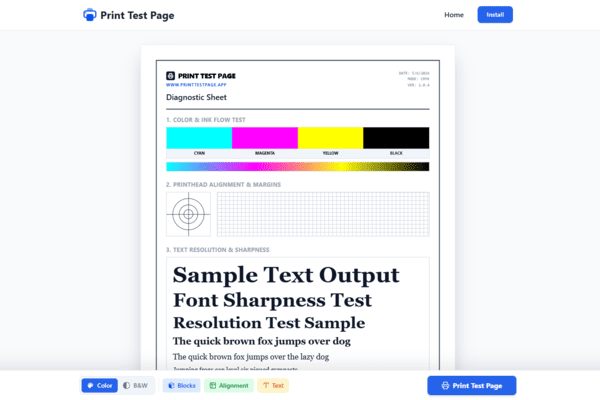
www.printtestpage.app
Diagnostic Sheet
DATE:
MODE: CMYK
VER: 2.0.4
1. Color & Ink Flow Test
2. Printhead Alignment & Margins
3. Text Resolution & Sharpness
Sample Text Output
Font Sharpness Test
Resolution Test Sample
The quick brown fox jumps over dog
The quick brown fox jumps over the lazy dog
Jumping frogs can level six piqued gymnasts
Grumpy wizards make toxic brew for the queen
Sympathizing would fix Quaker objectives quickly
A large fawn jumped quickly over white zinc boxes
Verified by printtestpage.app - Professional Diagnostic Output
Troubleshooting: Check for banding in blocks or blurred grids. If cyan/magenta/yellow are missing, clean printheads. For alignment issues, use your printer's utility software.
PRINTTESTPAGE.APP
Professional Printer Testing
Print Test Page
Don't let clogged nozzles or poor alignment ruin your documents. Use our professional-grade tools to ensure your printer is performing at its absolute best.
What is a Print Test Page?
A Print Test Page is a specialized document designed to check the functionality of your printer's hardware. It exercises every color channel and tests the precision of the mechanical feed system. By printing a test sheet, you can instantly see if your cartridges are low, if your print heads are dirty, or if the internal rollers are misaligned.
Benefits of Using a Print Test Page
Color Accuracy
Check if your Cyan, Magenta, Yellow, and Black (CMYK) cartridges are delivering true-to-life tones without fading or streaking.
Alignment Grids
Fix crooked text or jagged lines by using our precise alignment patterns to calibrate your printer heads for crisp output.
Technical Health
Regularly running a print test page prevents ink from drying in the nozzles, extending the life of your hardware.
Common Printer Troubleshooting
Faded or Light Colors?
Indicates low ink or clogged nozzles. Run a cleaning cycle and re-test.
Horizontal White Lines?
Usually a blocked print head. Our color blocks help identify which specific cartridge is the issue.
Blurred Text?
Your printer needs alignment. Use our grid tool to check synchronization.

Frequently Asked Questions
When should I use a Print Test Page?
You should run a test page if you notice missing colors, horizontal lines, or blurry text. It's also a great practice to print one every 2 weeks if the printer isn't used often to prevent ink from drying.
What is the difference between a Color and Grayscale test?
A color test checks all individual ink tanks (Cyan, Magenta, Yellow, Black). A grayscale test focuses specifically on the black cartridge and the printer's ability to produce different shades of gray.
Does this work for Laser printers too?
Absolutely. While laser printers don't "clog" like inkjets, they can suffer from drum issues or low toner distribution. A print test page helps identify streaks caused by dirty rollers or failing toner cartridges.
Why are there no colors on my test page?
If the page prints blank, check if you removed the protective tape from a new cartridge. If it's an old cartridge, the nozzles might be completely blocked, requiring a deep cleaning cycle from your printer's maintenance menu.
Is it safe to print multiple test pages?
Yes, it's perfectly safe. In fact, if you just cleaned your printer heads, you might need to print 2-3 pages to get the ink flowing perfectly again.
Our Quality Standard
We believe in providing professional diagnostic tools accessible to everyone. Our Print Test Page utility is regularly updated to ensure compatibility with modern high-resolution printing technology.